
How to fix error: Windows Protected your PC
Edited
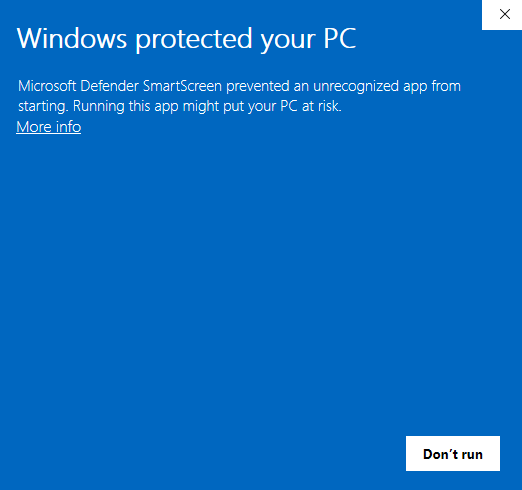
When installing DataMaster, Windows may display a “Windows protected your PC” message and prevent the installer from opening.
This message comes from Microsoft Defender SmartScreen. Follow the steps below to continue installing DataMaster.
Step 1
On the Windows protected your PC screen, click More info.
Note: Do not click Don’t run.
Step 2
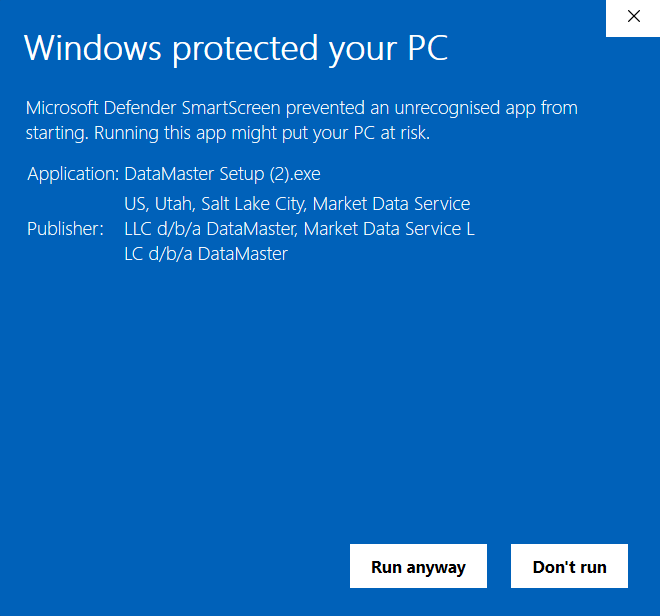
Windows will display additional information about the DataMaster installer.
Verify that the publisher references DataMaster / Market Data Service.
Step 3
Click Run anyway.
Step 4
The DataMaster installer should now open. Follow the prompts to complete the installation.
Still having trouble?
If you do not see the Run anyway option after clicking More info, or Windows continues to prevent DataMaster from installing, contact DataMaster Support for assistance.